KeyLoft™ helps you collect rent by connecting your preferred payment methods to your tenant invoices and reminders. You configure your payment links once, and they're automatically included in every invoice and reminder you send.
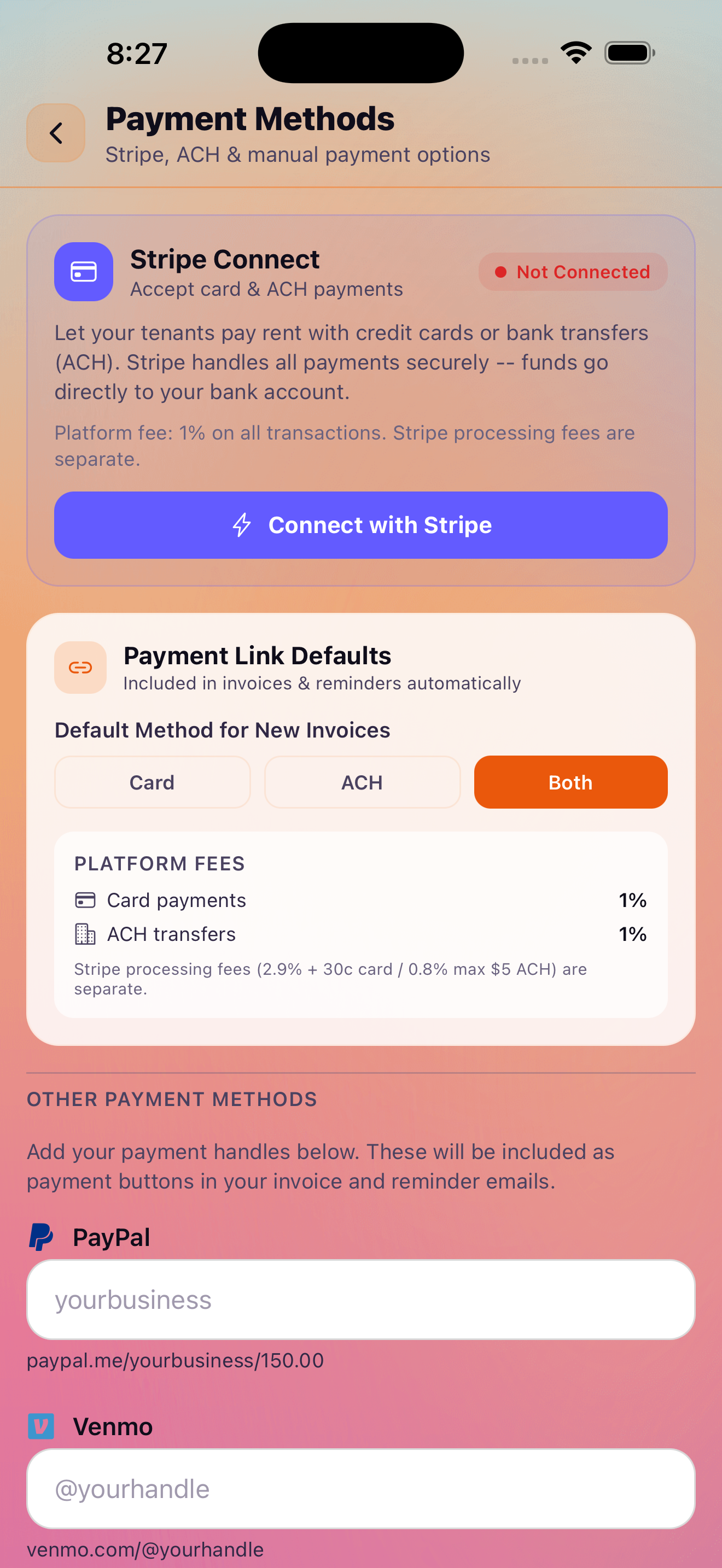
Payment Collection Setup
Find Payment Collection at More → Payments → Payment Collection. Here you configure the payment methods you want tenants to use. KeyLoft supports:
- Stripe — accept credit and debit card payments with a Stripe account
- ACH / bank transfer — direct bank account payments via Stripe
- PayPal — enter your PayPal link or username
- Venmo — enter your Venmo link or handle
Once configured, your payment links are automatically embedded in the PDF invoices and reminder emails you send to tenants, making it easy for them to pay.
Payment Methods Configuration
Open Settings (More → Settings) and navigate to payment settings to manage your configured payment methods. You can add, edit, or remove payment links at any time. Changes take effect on the next invoice or reminder you send.
PDF Lease Agreements & Invoices Pro
With Pro, KeyLoft can generate polished PDF documents:
- PDF lease agreements — generate a formatted lease document based on your tenant's lease details, ready to send for signature
- PDF rent invoices — generate a professional invoice for any rent charge, including line items, due date, and your payment links
To generate a PDF, open the tenant's charge or lease and tap the share/export icon. The PDF opens in the iOS share sheet so you can email it, save it to Files, or share it via Messages or any other app.
Recurring Invoices & Auto-Reminders Pro
With Pro, you can configure recurring rent invoice generation. KeyLoft creates a new invoice for each tenant automatically on the schedule you set — typically the first of each month — and sends auto-reminders on your configured timeline.
Rent Reminder Emails Pro
KeyLoft can automatically email rent reminders to your tenants. Configure reminder timing in Settings (More → Settings → Rent Reminders). Three reminder options are available:
- 3 days before due — a friendly heads-up reminder
- 1 day before due — a last-minute payment reminder
- Past due notice — sent when rent is overdue
Each reminder type can be toggled on or off individually. Reminders include your payment links so tenants can pay directly from the email.
Rent reminder emails require the tenant's email address to be saved in their profile. Make sure you've added an email when creating each tenant.
What's Next
Get paid faster with automated reminders
KeyLoft Pro handles rent reminders so you don't have to chase tenants manually.
Download on the App Store